WebSphere部署及client呼叫SSL Service
主題: |
WebSphere部署及client呼叫SSL Service |
文章簡介: |
介紹Local使用Tomcat Server開發,實際部署到WebSphere需注意的事項 |
作者: |
李佳樺 |
版本/產出日期: |
V1.0/2015.09.04 |
1.前言3
2.目的3
3.開始前準備3
4.部署配置3
5.Apache CXF client 呼叫SSL service6
6.參考來源12
1. 前言
• 本文件用來提供Java開發人員在本機開發應用程時使用Tomcat, 但實際執行Server為WebSphere部署時需注意事項
• 適用於Apache CXF Web Service,以此為例把相關遇到的問題整理相關解決方案
2. 目的
• 本機開發時可以用輕量的AP Server - Tomcat
3. 開始前準備
• 安裝WebSphere 8.5
4. 部署配置
Deploying Apache CXF service
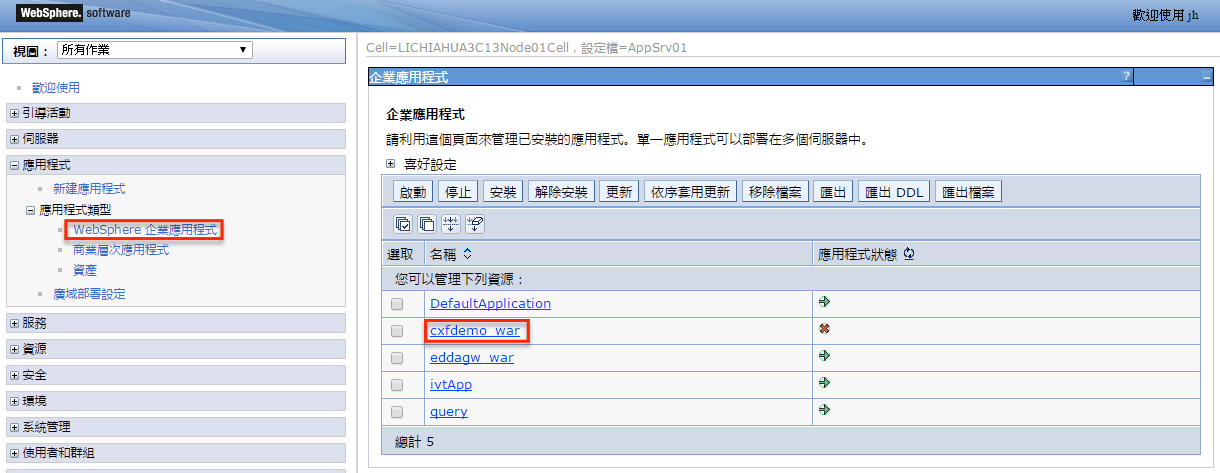
4.1、 程式匯出成.war檔, 部署到WebSphere,部署成功,但實際執行功能時報錯,點選部署上去的war檔

4.2、 點選「管理模組」
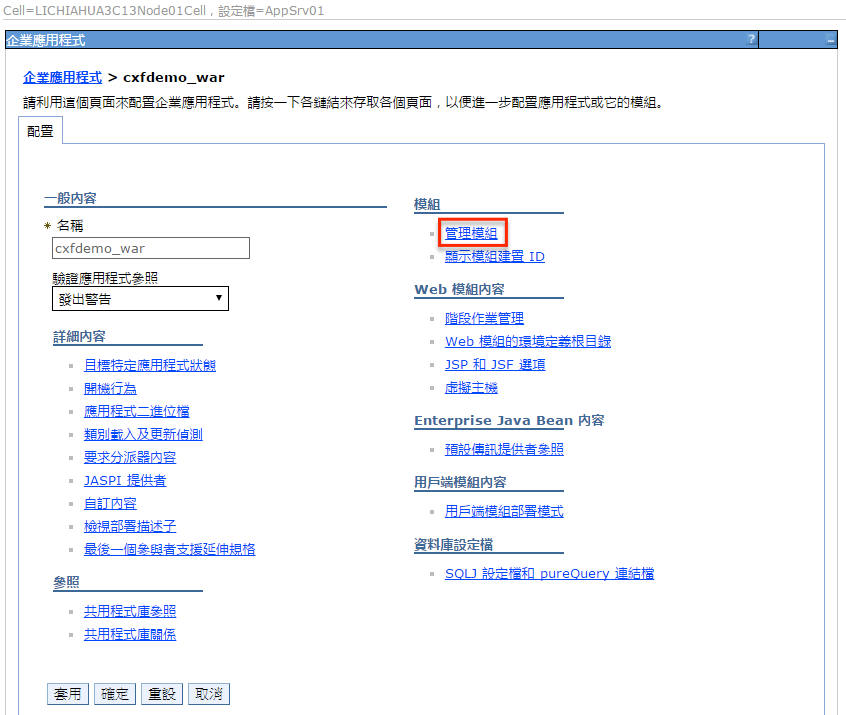

4.3、 載入以war的lib為主先作載入
以此project為例,以下2個jar檔不需包入war,需拿掉,否則會報衝突
validation-api-1.0.0.GA.jar
activation-1.1.jar
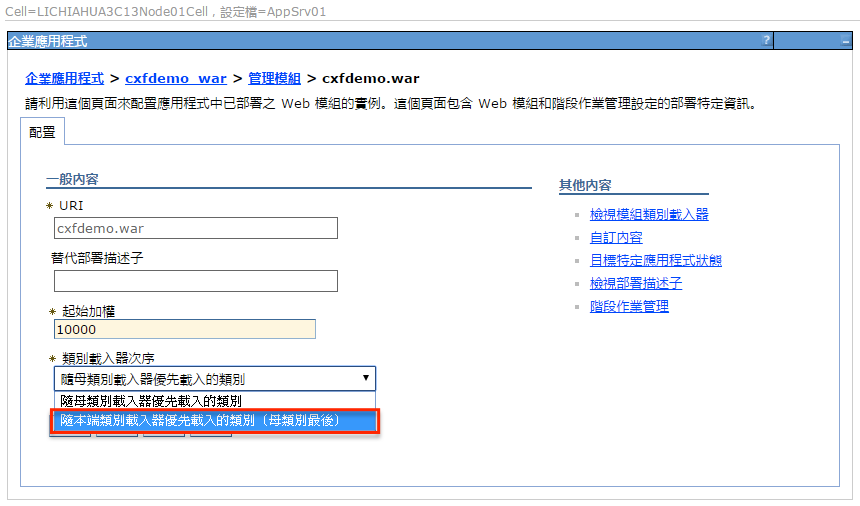
遇到Exception如下:
neethi的版本衝突,解決方式調整「類別載入器次序」,其它則把非必要jar拿掉即可。
[2015/8/6 14:46:36:618 GMT+08:00] 00000046 webapp E com.ibm.ws.webcontainer.webapp.WebApp notifyServletContextCreated SRVE0283E: 起始設定環境定義時,捕捉到異常狀況:{0}
org.springframework.beans.factory.BeanCreationException: Error creating bean with name 'cxf' defined in class path resource [META-INF/cxf/cxf.xml]: Instantiation of bean failed; nested exception is org.springframework.beans.BeanInstantiationException: Could not instantiate bean class [org.apache.cxf.bus.spring.SpringBus]: Constructor threw exception; nested exception is org.apache.cxf.bus.extension.ExtensionException: Could not load extension class org.apache.cxf.ws.policy.PolicyBuilderImpl.
[2015/8/6 15:19:35:959 GMT+08:00] 0000007a webapp E com.ibm.ws.webcontainer.webapp.WebApp notifyServletContextCreated SRVE0283E: 起始設定環境定義時,捕捉到異常狀況:{0}
org.springframework.beans.factory.BeanCreationException: Error creating bean with name 'cxf' defined in class path resource [META-INF/cxf/cxf.xml]: Instantiation of bean failed; nested exception is org.springframework.beans.BeanInstantiationException: Could not instantiate bean class [org.apache.cxf.bus.spring.SpringBus]: Constructor threw exception; nested exception is org.apache.cxf.bus.extension.ExtensionException: Could not load extension class org.apache.cxf.ws.policy.AssertionBuilderRegistryImpl.
Caused by: org.springframework.beans.factory.BeanCreationException: Error creating bean with name 'org.springframework.web.servlet.mvc.method.annotation.RequestMappingHandlerAdapter#0': Cannot create inner bean '(inner bean)#b6b5e153' of type [org.springframework.web.bind.support.ConfigurableWebBindingInitializer] while setting bean property 'webBindingInitializer'; nested exception is org.springframework.beans.factory.BeanCreationException: Error creating bean with name '(inner bean)#b6b5e153': Cannot resolve reference to bean 'validator' while setting bean property 'validator'; nested exception is org.springframework.beans.factory.BeanCreationException: Error creating bean with name 'validator' defined in class path resource [spring/spring-mvc.xml]: Invocation of init method failed; nested exception is javax.validation.ValidationException: Unable to get available provider resolvers.
at org.springframework.beans.factory.support.BeanDefinitionValueResolver.resolveInnerBean(BeanDefinitionValueResolver.java:287)
5. Apache CXF client 呼叫SSL service
Apache CXF client to use WebSphere truststore
WebSphere上使用CXF Client去呼叫SSL的WebService,實作時發現使用jks,一直無法認證成功(丟出com.ibm.jsse2.util.j: No trusted certificate found 錯誤訊息),故改使用WebSphere truststore, 有2個方法,但WebSphere設定不管是那個方法都需要作。
5.1、 WebSphere設定
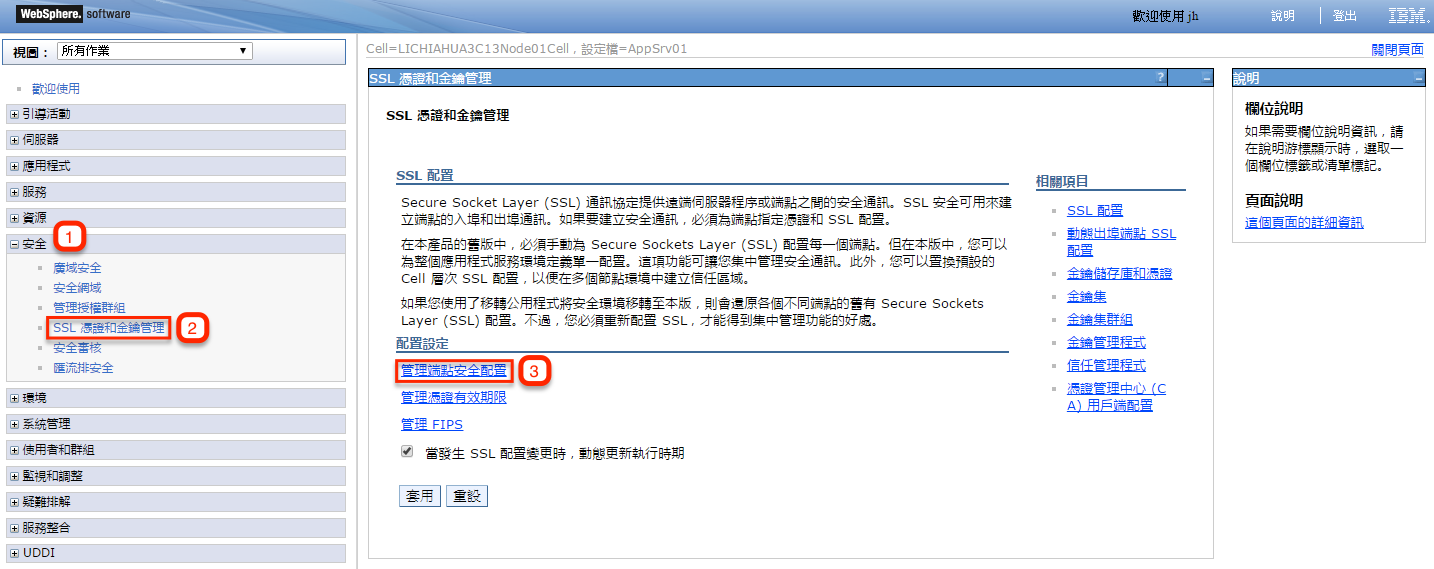
1. 登入管理主控台。
2. 展開「安全」,然後按一下 SSL 憑證和金鑰管理。在「配置設定」之下,按一下「管理端點安全配置」。
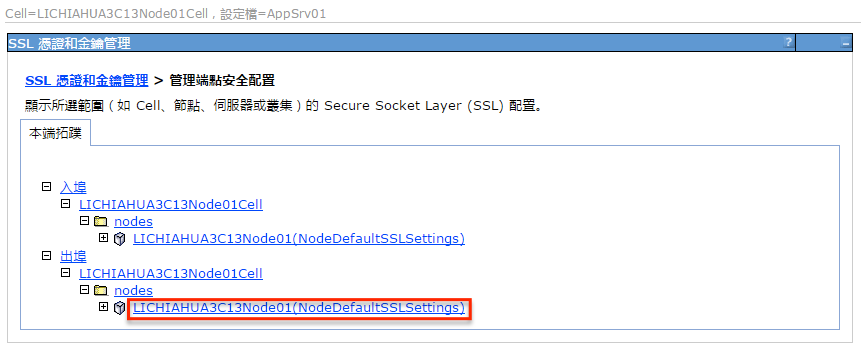
3. 選取適當的出埠配置以取得 (cell):LICHIAHUA3C13Node01Cell:(node):LICHIAHUA3C13Node01
管理範圍。
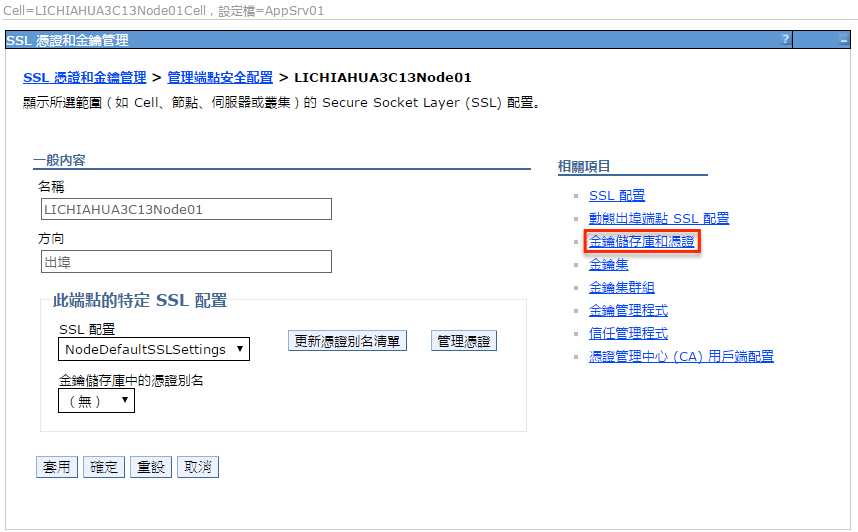
4. 在「相關項目」之下,按一下「金鑰儲存庫和憑證」,再按一下 NodeDefaultTrustStore 金鑰儲
存庫。
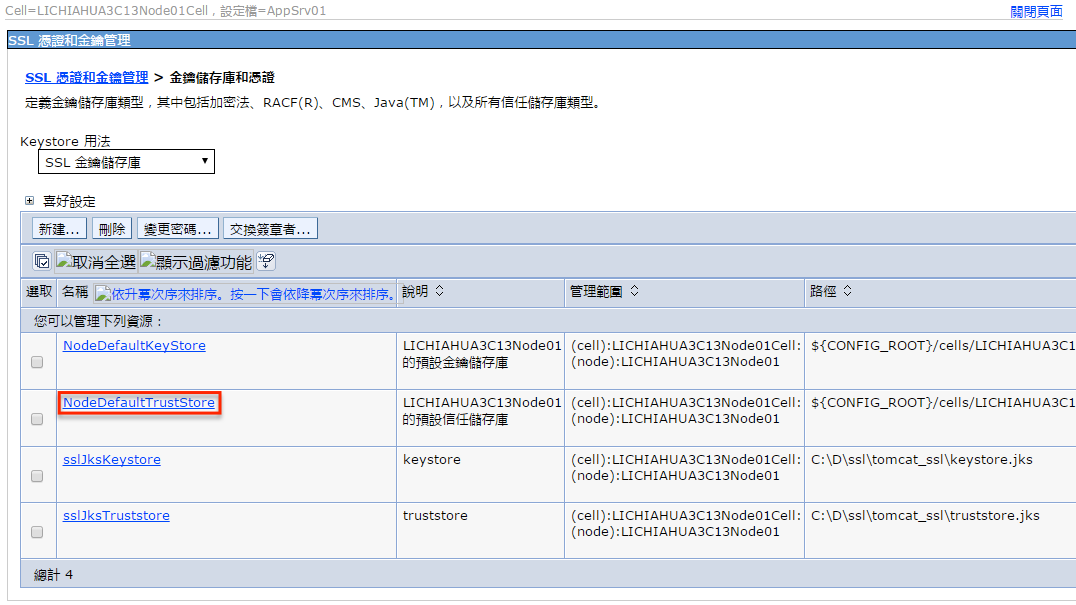
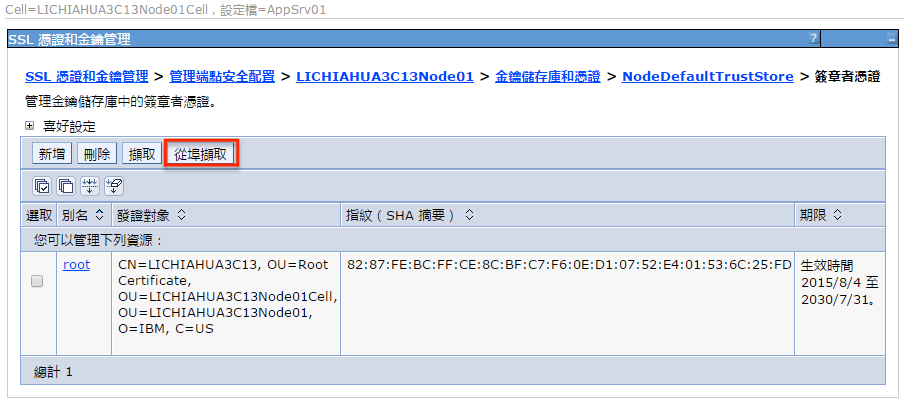
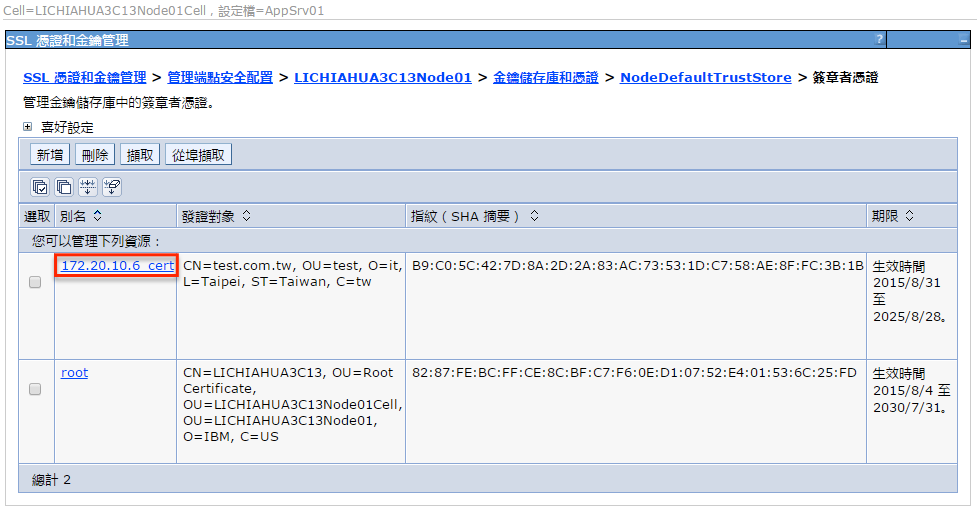
5. 在「其他內容」之下,按一下「簽章者憑證」和「從埠擷取」。

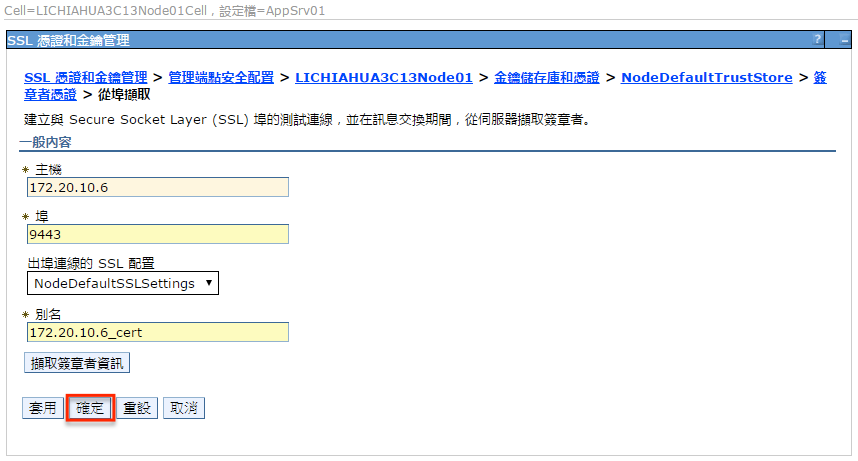
6. 以local測試為例
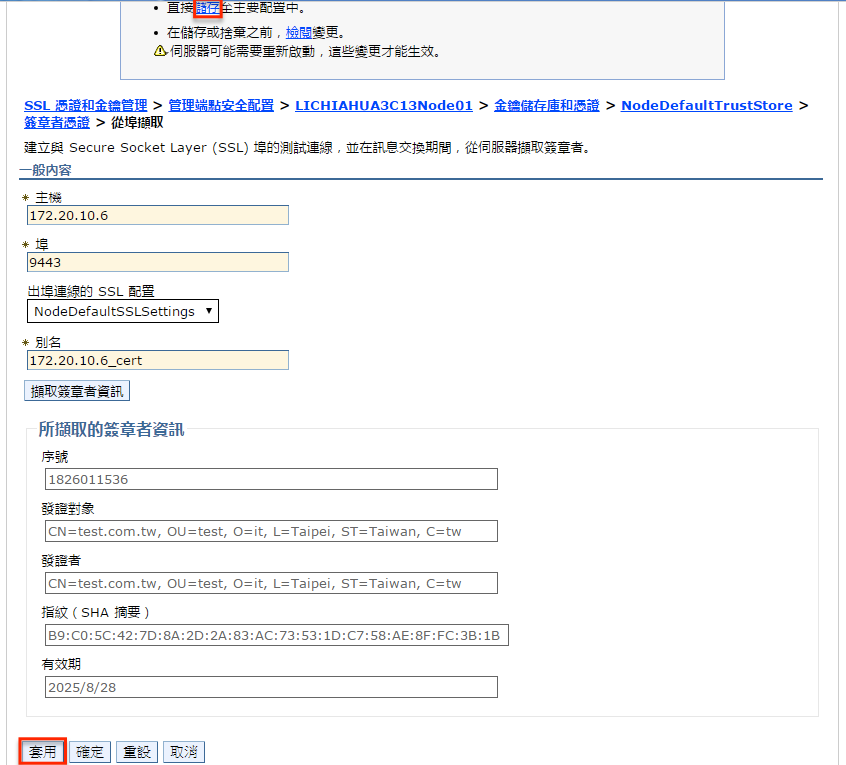
在「主機」欄位中,針對「主機名稱」欄位輸入 172.20.10.6,「埠」欄位輸入 9443,「別名」欄位輸入 172.20.10.6_cert。
7. 按一下「擷取簽章者資訊」。
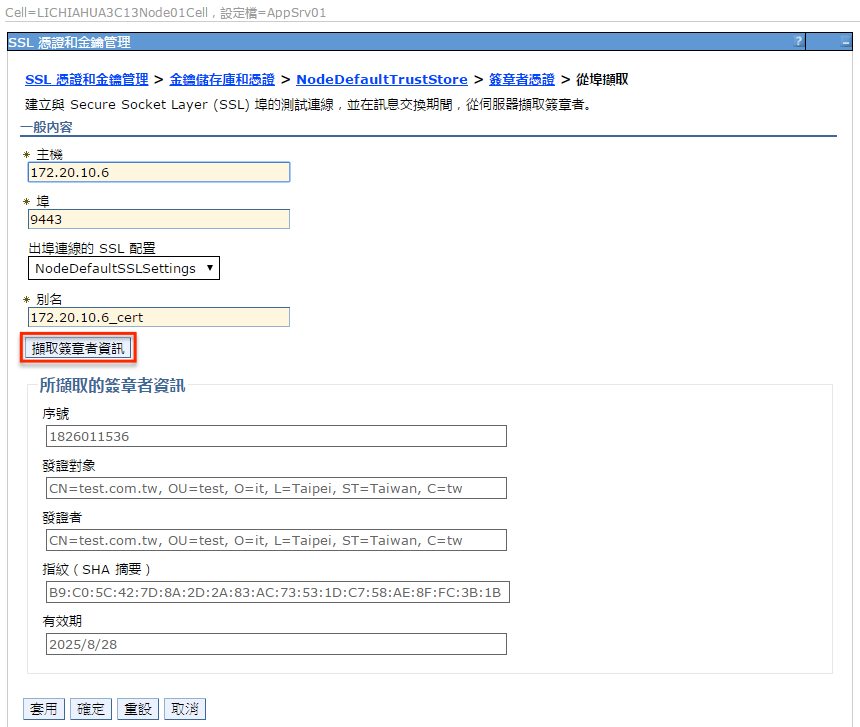
8. 驗證憑證資訊是屬於您可以信任的憑證。
9. 按一下「套用並儲存」。
5.2、 方法一
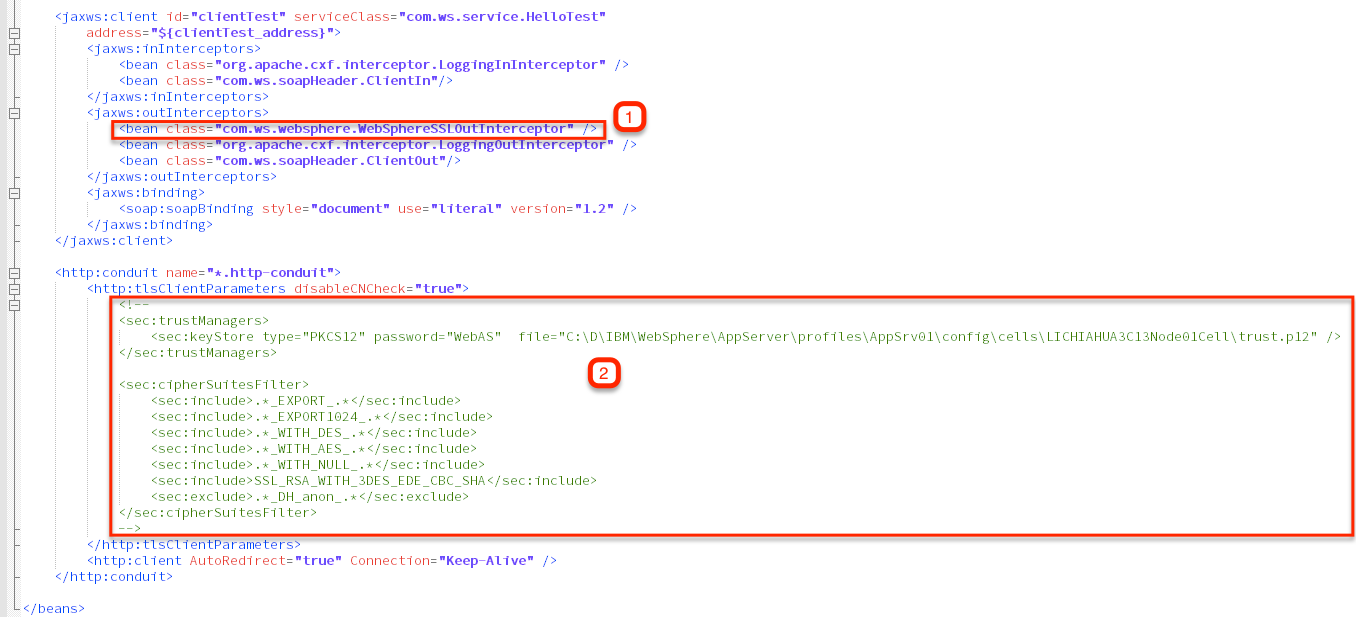
(1)加上 <bean class="com.ws.websphere.WebSphereSSLOutInterceptor" />
WebSphereSSLOutInterceptor寫法請參考「參考來源-websphere-cxf-extensions」
把紅框(2)內容註解起來,因如用該方法則用不到
5.3、 方法二
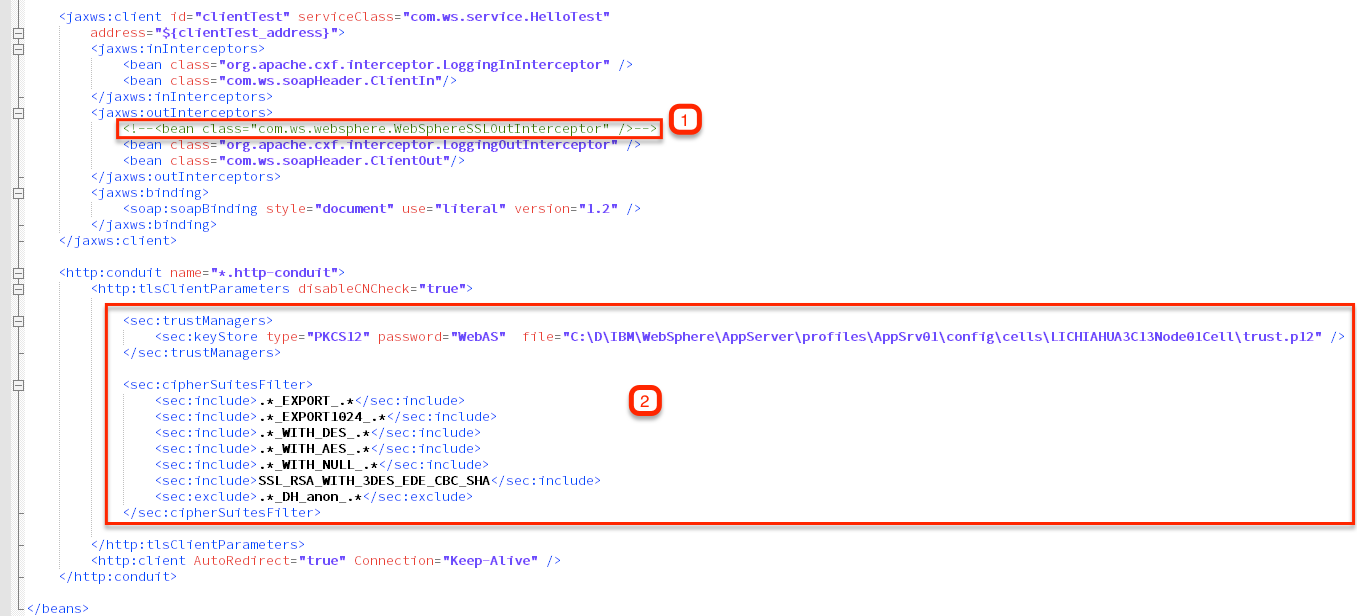
(1)方法一加入的<bean class="com.ws.websphere.WebSphereSSLOutInterceptor" /> 用不到註解掉,或刪除
(2)方法一時註解掉的,把它打開,並加入WebSphere 的truststore Key trust.p12
6. 參考來源
• Trial download: WebSphere Application Server 8.5
https://www-01.ibm.com/marketing/iwm/tnd/preconfig.jsp?id=2012-06-14+11%3A09%3A34.913019R&S_TACT=&S_CMP=
• websphere-cxf-extensions
https://github.com/vlussenburg/websphere-cxf-extensions#websphere-cxf-extensions
• 不能加載org.apache.neethi.PolicyBuilder類解決方案
http://loginleft.iteye.com/blog/2005710
• No trusted certificate found
http://itquestionz.com/questions/555103/how-to-set-up-apache-cxf-client-to-use-websphere
-truststore-receiving-no-trus
http://stackoverflow.com/questions/21336145/certificate-not-trusted-by-websphere