Spring Cache
改善資料庫I/O效能瓶頸的利器 -- Spring Cache
2018/12/14 10:00:00
0
387
改善資料庫I/O效能瓶頸的利器 -- Spring Cache
| 簡介 |
當資料庫I/O的效率成為系統效能的瓶頸,透過Cache機制可以大幅度改善系統效能。而Spring Cache整合了多種Cache套件,提供統一的技術抽象介面,降低使用Cache機制的難度。藉由本文章的實例測試來瞭解Cache機制提升效能之處為何?也可從例子中學習Cache機制在Spring Annotation支援下如何使用。 |
| 作者 |
羅國榮 |
前言
本文將藉由實際的例子來測試、觀察Cache機制,這是一個最直接且實務的方法。
簡介Spring Cache
Spring Cache 是作用在方法上的,其核心思想是這樣的:當我們在呼叫一個快取方法時會把該方法引數和返回結果作為一個鍵值對存放在快取中,等到下次利用同樣的引數來呼叫該方法時將不再執行該方法,而是直接從快取中獲取結果進行返回。
Spring Cache 主要提供了四個註解(Annotation)用以支援Cache機制:
- @CacheConfig
- @CachePut
- @Cacheable
- @CacheEvict
@CacheConfig 是在Spring 4.1提供的,之前在每一個用到@Cacheable註解時,都要加上value參數用以指定Cache名稱。現在可用@CacheConfig 標註在類別名稱上,宣告一次就可以了。例如: @CacheConfig(cacheNames = "users"),表示此類別內的Cache資料皆放到名稱為users的快取區內。
@CachePut可以標記在一個方法上,也可以標記在一個類上。當標註的方法在執行前不會去檢查快取中是否存在之前執行過的結果,而是每次都會執行該方法,並將執行結果以鍵值對的形式存入指定的快取中。
@Cacheable可以標記在一個方法上,也可以標記在一個類上。當標記在一個方法上時表示該方法是支援快取的,當標記在一個類上時則表示該類所有的方法都是支援快取的。對於一個支援快取的方法,Spring會在其被呼叫後將其返回值快取起來,以保證下次利用同樣的引數來執行該方法時可以直接從快取中獲取結果,而不需要再次執行該方法。
@CacheEvict是用來標註在需要清除快取元素的方法或類上的。當標記在一個類上時表示其中所有的方法的執行都會觸發快取的清除操作。
開始測試......
進行測試前,先開發一個簡單的Spring Boot專案,該專案建構具備CRUD功能的二組Restful API。一組Restful API不使用Cache機制;一組Restful API使用Cache機制。
(專案的建立、啟動以及程式碼請參考附錄一 ~ 附錄三)
然後,在MySQL的資料庫建立一個system_user表格,並使用Postman工具發送二組Restful API,分別對system_user表格進行新增、修改、查詢等操作,查看顯示在Console的訊息,從訊息的變化就能發現Cache機制確實能有效地減少查詢資料的次數,進而提升系統I/O的效率。
使用無Cache機制的CRUD功能
測試步驟:
步驟1.新增使用者 -- 透過userService.insertUser()新增一筆資料到system_user表格。因insertUser()函式無使用@CachePut註解,此筆資料會被新增至資料庫,但是不會被新增在Cache區中。所以,新增之後的查詢,仍會再次從system_user表格讀取資料。
步驟2.查詢使用者 -- 透過userService.findUserById()從system_user表格查詢一筆資料。因findUserById()函式無使用@Cacheable註解,不會從Cache區取出資料。所以,會再次從system_user表格讀取資料。
步驟3.更新使用者 -- 透過userService.updateUser()更新system_user表格的資料。因updateUser()函式無使用@CachePut註解,此筆資料會被更新至資料庫,但是不會被更新至Cache區中。所以,更新之後的查詢,仍會再次從system_user表格讀取資料。
步驟4.查詢使用者 -- 透過userService.findUserById()從system_user表格查詢一筆資料。因findUserById()函式無使用@Cacheable註解,此筆資料不會從Cache區中取出。所以,查詢時會再次從system_user表格讀取資料。
以上測試步驟的主要目的是觀察讀取資料的行為,是否每次都直接從資料庫表格讀取。
- 先新增一筆資料然後將該筆資料讀出 --> 從 Console 觀察,將該筆資料讀出時,是否有下 select 指令讀取資料 (確實每次讀取都會下select 指令)
- 更新同一筆資料然後將該筆資料讀出 --> 從 Console 觀察,將該筆資料讀出時,是否有下 select 指令讀取資料 (確實每次讀取都會下select 指令)
//<<<<
Console 輸出:
以下二行訊息為「新增使用者」輸出 >>
----------正在執行UserService.insertUser()----------
Hibernate: insert into system_user (age, name) values (?, ?)
以下二行訊息為「查詢使用者」輸出 >>
----------正在執行UserService.findUserById()----------
Hibernate: select systemuser0_.id as id1_0_0_, systemuser0_.age as age2_0_0_, systemuser0_.name as name3_0_0_ from system_user systemuser0_ where systemuser0_.id=?
以下四行訊息為「更新使用者」輸出 >>
----------正在執行UserCacheService.findUserById()----------
Hibernate: select systemuser0_.id as id1_0_0_, systemuser0_.age as age2_0_0_, systemuser0_.name as name3_0_0_ from system_user systemuser0_ where systemuser0_.id=?
----------正在執行UserService.updateUser()----------
Hibernate: update system_user set age=?, name=? where id=?
以下二行訊息為「查詢使用者」輸出 >>
----------正在執行UserService.findUserById()----------
Hibernate: select systemuser0_.id as id1_0_0_, systemuser0_.age as age2_0_0_, systemuser0_.name as name3_0_0_ from system_user systemuser0_ where systemuser0_.id=?
※ 為了方便識別每一個步驟會顯示哪些訊息,上列訊息經過處理,與Console原訊息排列不同
>>>//
從以上的訊息中可以發現,每次查詢都會執行select SQL語法,從資料庫中取出資料。
使用Cache機制的查詢也會每次都執行select SQL語法嗎?
以下列出Postman截圖:
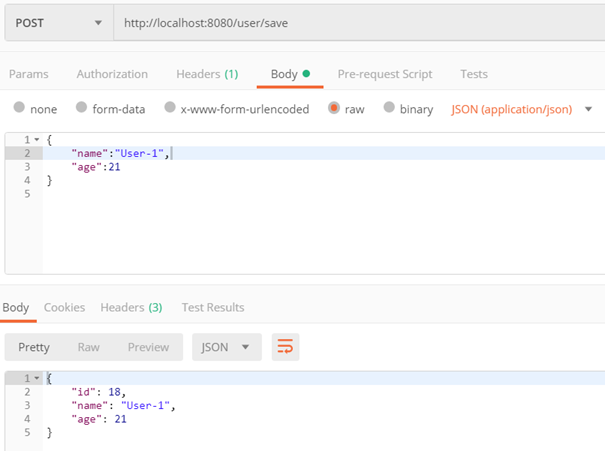
新增使用者
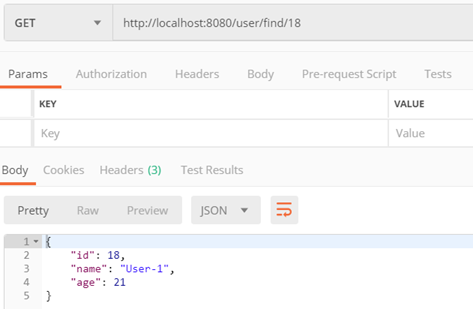
查詢使用者
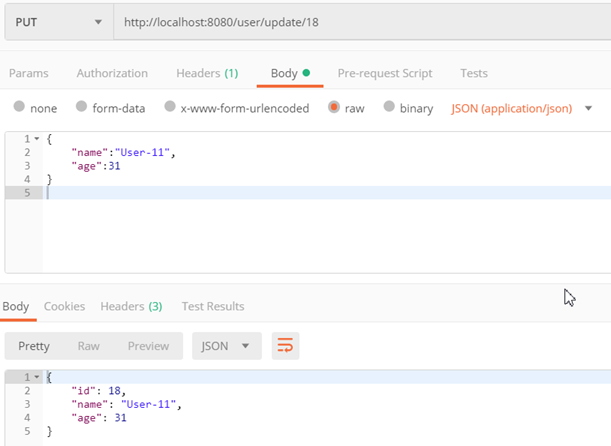
更新使用者
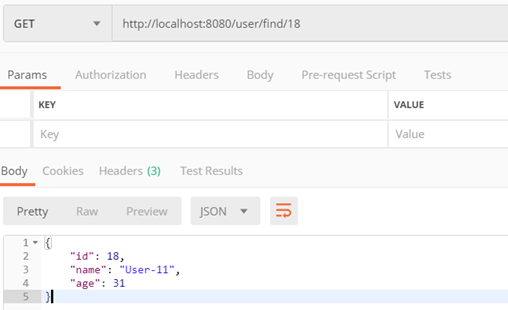
查詢使用者
使用Cache機制的CRUD功能
測試步驟:
步驟1.新增使用者 -- 透過userCacheService.insertUser()新增一筆資料到system_user表格。因insertUser()函式使用@CachePut註解,此筆資料除了會被新增到資料庫外,還會被保存在Cache區中。所以,新增之後的查詢,不會再次從system_user表格讀取資料。
步驟2.查詢使用者 -- 因userCacheService.findUserById()函式使用@Cacheable註解,Cache機制直接從Cache區取出資料,並且
不會執行findUserById()函式。
步驟3.更新使用者 -- 透過userCacheService.updateUser()更新system_user表格的資料。因updateUser()函式使用@CachePut註解,此筆資料除了更新至資料庫外,還會被更新至Cache區中。所以,更新之後的查詢,不會再次從system_user表格讀取資料。
步驟4.查詢使用者 -- 因userCacheService.findUserById()函式使用@Cacheable註解,Cache機制直接從Cache區取出資料,並且
不會執行findUserById()函式。
以上測試步驟的主要目的是觀察讀取資料的行為,是否每次都直接從資料庫表格讀取。
- 先新增一筆資料然後將該筆資料讀出 --> 從 Console 觀察,將該筆資料讀出時,是否有下 select 指令讀取資料 (確實每次讀取都不會下select 指令)
- 更新同一筆資料然後將該筆資料讀出 --> 從 Console 觀察,將該筆資料讀出時,是否有下 select 指令讀取資料 (確實每次讀取都不會下select 指令)
//>>>>>>
Console 輸出:
以下二行訊息為「新增使用者」輸出 >>
----------正在執行UserCacheService.insertUser()----------
Hibernate: insert into system_user (age, name) values (?, ?)
以下三行訊息為「更新使用者」輸出 >>
----------正在執行UserCacheService.updateUser()----------
Hibernate: select systemuser0_.id as id1_0_0_, systemuser0_.age as age2_0_0_, systemuser0_.name as name3_0_0_ from system_user systemuser0_ where systemuser0_.id=?
Hibernate: update system_user set age=?, name=? where id=?
※ 為了方便識別每一個步驟會顯示哪些訊息,上列訊息經過處理,與Console原訊息排列不同
<<<<<<//
從以上的訊息中可以發現,第二步驟、第四步驟的「查詢使用者」沒有被執行,也就表示該資料是直接從Cache中取出,節省了從資料庫讀取資料的I/O開銷,也就提升了系統I/O的效能!。
以下列出Postman截圖:
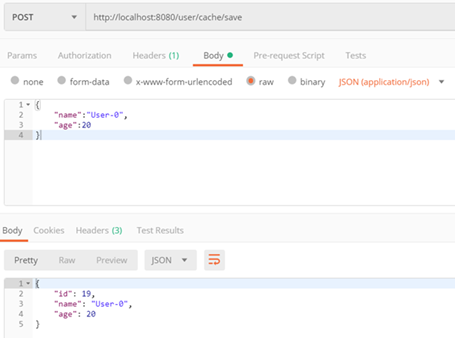
新增使用者
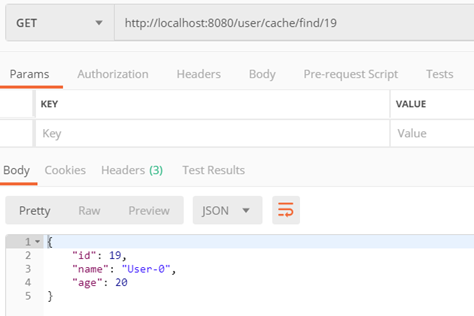
查詢使用者
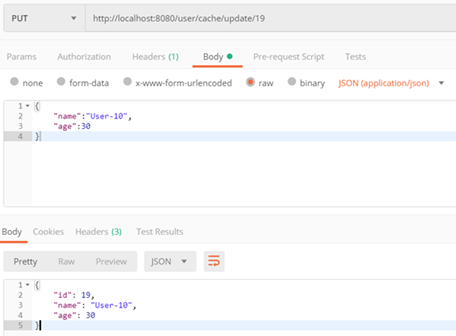
更新使用者
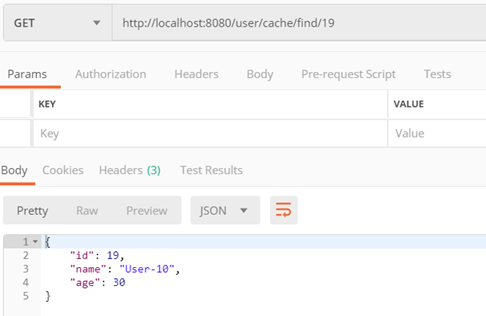
查詢使用者
結論
從以上的測試結果中,可以明確知道Cache機制確實可以減少讀取資料庫I/O的次數。
當系統常常需要大量讀取資料庫的情況,利用Cache機制除了改善I/O效能之外,也間接地加快系統的回應速度,也減少了網路流量的傳遞。
在現今系統中,Cache機制應當列入系統必要的機制之一了。
附錄一
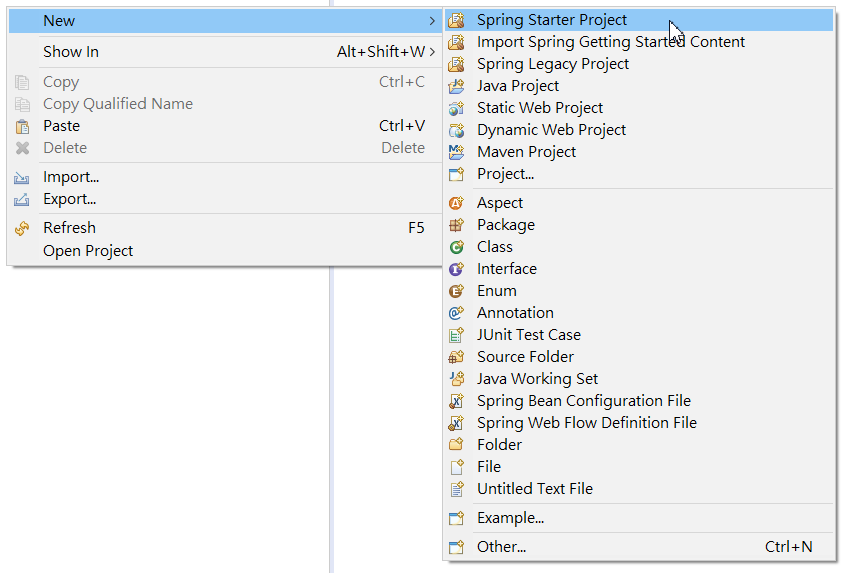
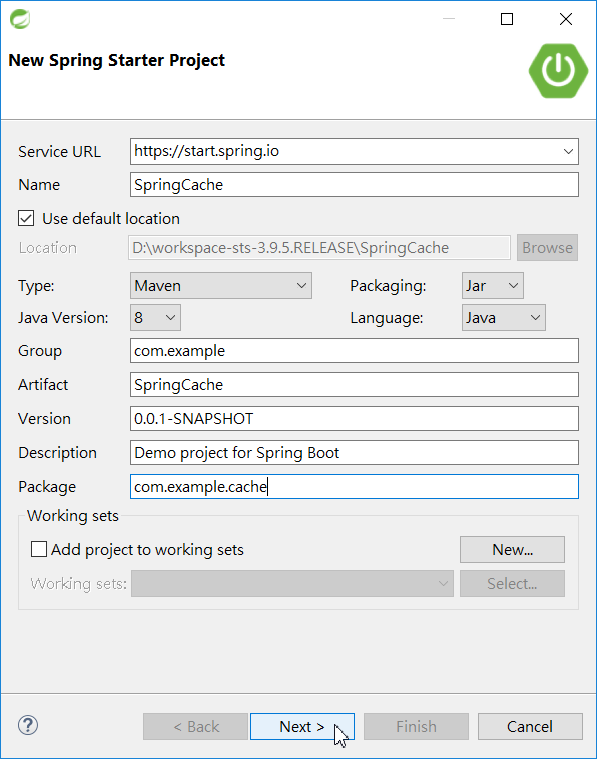
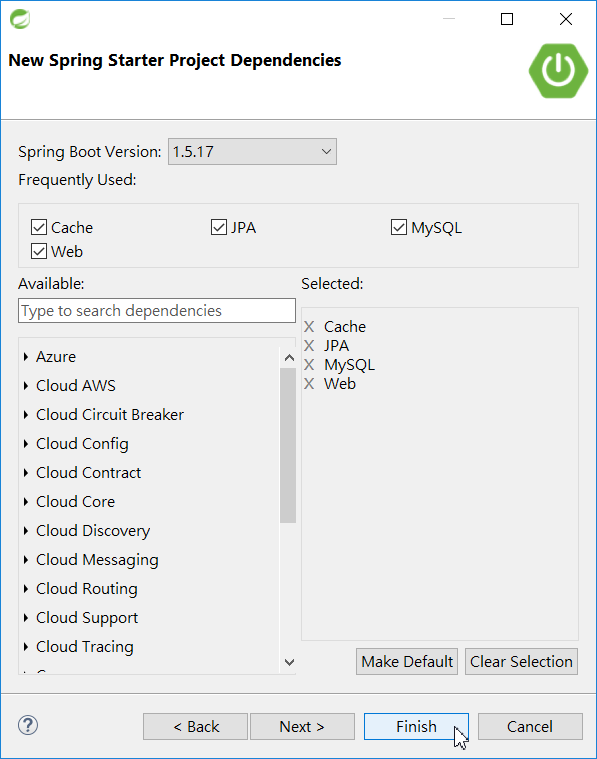
專案使用 Spring Boot、Restful Controller、JPA、Cache 等套件。 使用STS IDE 提供的建構專案介面可以快速建立一個專案。
建立專案的過程請參考下列截圖。
(1) 開始建立專案
(2) 填入專案基本資料
(3) 勾選需要用到的套件
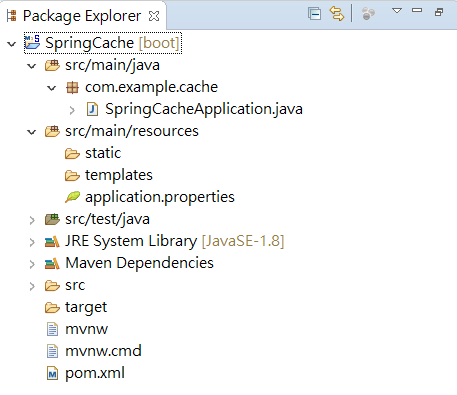
(4) 建立專案完成,專案架構雛形已建立
附錄二
執行Spring Boot專案
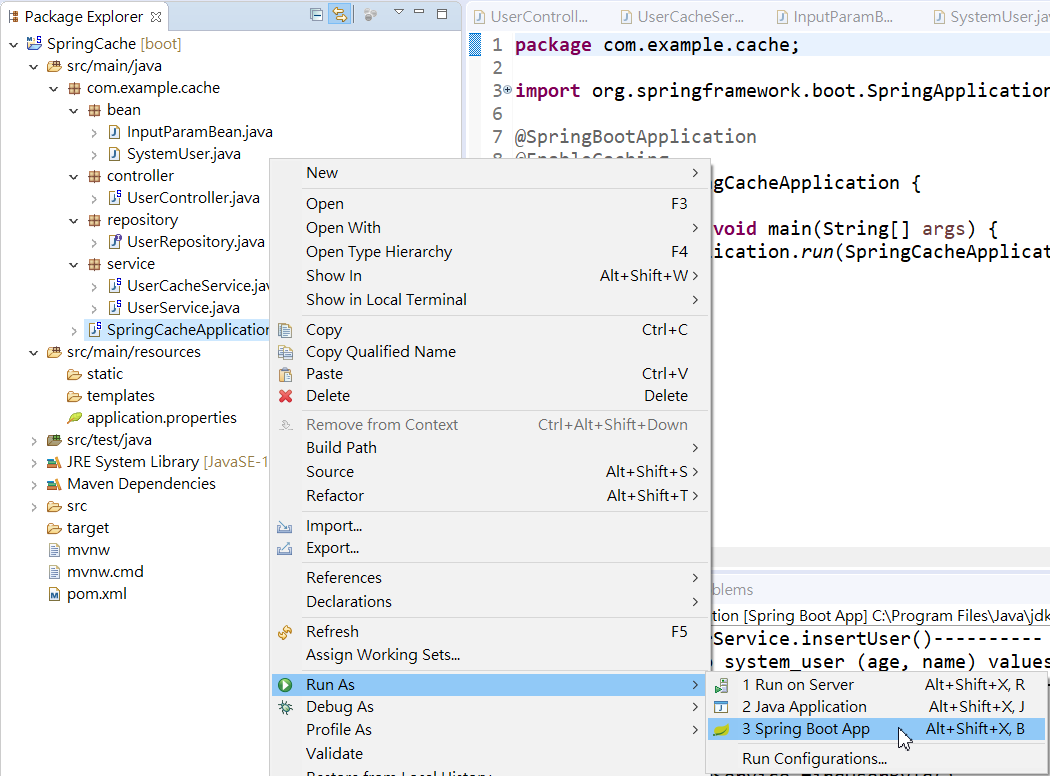
在Package Explorer中,點選「SpringCacheApplication.java」,並點擊滑鼠右鍵,從選單中點選「Run As」-->「Spring Boot App」,從Console視窗中可以觀察到Spring Boot已經啟動,也會啟動一個嵌入式Tomcat,其埠號預設為8080。
附錄三 程式碼
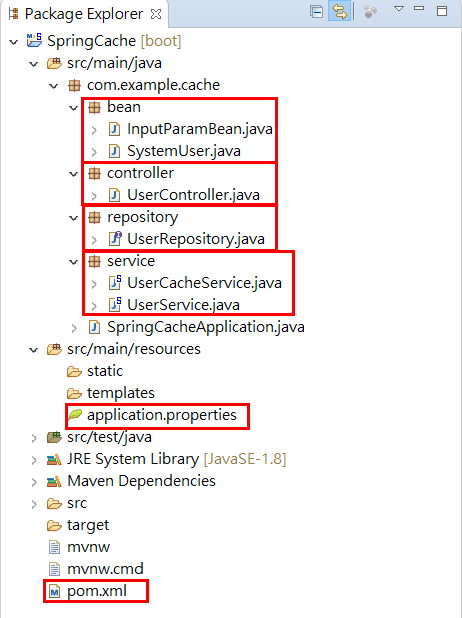
逐一將相關的Controller、Service、Repository和Entity等程式完成。
最終的專案拓樸圖,如下圖:
pom.xml
<?xml version="1.0" encoding="UTF-8"?>
<project xmlns="http://maven.apache.org/POM/4.0.0" xmlns:xsi="http://www.w3.org/2001/XMLSchema-instance"
xsi:schemaLocation="http://maven.apache.org/POM/4.0.0 http://maven.apache.org/xsd/maven-4.0.0.xsd">
<modelVersion>4.0.0</modelVersion>
<groupId>com.example</groupId>
<artifactId>SpringCache</artifactId>
<version>0.0.1-SNAPSHOT</version>
<packaging>jar</packaging>
<name>SpringCache</name>
<description>Demo project for Spring Boot</description>
<parent>
<groupId>org.springframework.boot</groupId>
<artifactId>spring-boot-starter-parent</artifactId>
<version>1.5.17.RELEASE</version>
<relativePath/> <!-- lookup parent from repository -->
</parent>
<properties>
<project.build.sourceEncoding>UTF-8</project.build.sourceEncoding>
<project.reporting.outputEncoding>UTF-8</project.reporting.outputEncoding>
<java.version>1.8</java.version>
</properties>
<dependencies>
<dependency>
<groupId>org.springframework.boot</groupId>
<artifactId>spring-boot-starter-cache</artifactId>
</dependency>
<dependency>
<groupId>org.springframework.boot</groupId>
<artifactId>spring-boot-starter-data-jpa</artifactId>
</dependency>
<dependency>
<groupId>org.springframework.boot</groupId>
<artifactId>spring-boot-starter-web</artifactId>
</dependency>
<dependency>
<groupId>mysql</groupId>
<artifactId>mysql-connector-java</artifactId>
<scope>runtime</scope>
</dependency>
<dependency>
<groupId>org.springframework.boot</groupId>
<artifactId>spring-boot-starter-test</artifactId>
<scope>test</scope>
</dependency>
</dependencies>
<build>
<plugins>
<plugin>
<groupId>org.springframework.boot</groupId>
<artifactId>spring-boot-maven-plugin</artifactId>
</plugin>
</plugins>
</build>
</project>
application.properties
spring.datasource.url=jdbc:mysql://localhost:3306/test?useUnicode=true&characterEncoding=utf-8&autoReconnect=true&useSSL=false
spring.datasource.username=root
spring.datasource.password=root
spring.datasource.driver-class-name=com.mysql.jdbc.Driver
spring.jpa.database=MYSQL
spring.jpa.properties.hibernate.show_sql=true
SpringCacheApplication.java
package com.example.cache;
import org.springframework.boot.SpringApplication;
import org.springframework.boot.autoconfigure.SpringBootApplication;
import org.springframework.cache.annotation.EnableCaching;
@SpringBootApplication
@EnableCaching
public class SpringCacheApplication {
public static void main(String[] args) {
SpringApplication.run(SpringCacheApplication.class, args);
}
}
UserController.java
package com.example.cache.controller;
@RestController
@RequestMapping(value = "/user")
public class UserController {
@Autowired
private UserCacheService userCacheService;
@Autowired
private UserService userService;
/** 使用Cache,新增使用者 */
@RequestMapping(value = "/cache/save", method = RequestMethod.POST)
public SystemUser saveUserByCache(@RequestBody InputParamBean inputParam) {
return userCacheService.insertUser(prepareSystemUser(inputParam));
}
/** 使用Cache,查詢使用者 */
@RequestMapping(value = "/cache/find/{id}", method = RequestMethod.GET)
public SystemUser getUserByCache(@PathVariable Integer id) {
return userCacheService.findUserById(id);
}
/** 使用Cache,更新使用者 */
@RequestMapping(value = "/cache/update/{id}", method = RequestMethod.PUT)
public SystemUser putUserByCache(@PathVariable Integer id, @RequestBody InputParamBean inputParam) {
return userCacheService.updateUser(prepareSystemUser(id, inputParam));
}
/** 使用Cache,刪除使用者 */
@RequestMapping(value = "/cache/delete/{id}", method = RequestMethod.DELETE)
public Integer deleteUserByCache(@PathVariable Integer id) {
userCacheService.deleteUserById(id);
return id;
}
/** 無使用Cache,新增使用者 */
@RequestMapping(value = "/save", method = RequestMethod.POST)
public SystemUser saveUser(@RequestBody InputParamBean inputParam) {
return userService.insertUser(prepareSystemUser(inputParam));
}
/** 無使用Cache,查詢使用者 */
@RequestMapping(value = "/find/{id}", method = RequestMethod.GET)
public SystemUser getUser(@PathVariable Integer id) {
return userService.findUserById(id);
}
/** 無使用Cache,更新使用者 */
@RequestMapping(value = "/update/{id}", method = RequestMethod.PUT)
public SystemUser putUser(@PathVariable Integer id, @RequestBody InputParamBean inputParam) {
return userService.updateUser(prepareSystemUser(id, inputParam));
}
/** 無使用Cache,刪除使用者 */
@RequestMapping(value = "/delete/{id}", method = RequestMethod.DELETE)
public Integer deleteUser(@PathVariable Integer id) {
userService.deleteUserById(id);
return id;
}
private SystemUser prepareSystemUser(InputParamBean inputParam) {
SystemUser user = new SystemUser();
user.setAge(inputParam.getAge());
user.setName(inputParam.getName());
return user;
}
private SystemUser prepareSystemUser(Integer id, InputParamBean inputParam) {
SystemUser user = userCacheService.findUserById(id);
if (user == null) {
return new SystemUser();
}
user.setName(inputParam.getName());
user.setAge(inputParam.getAge());
return user;
}
}
UserCacheService.java
package com.example.cache.service;
@CacheConfig(cacheNames = "users")
@Service
public class UserCacheService {
@Autowired
private UserRepository userRepository;
/**
* 新增用户
*/
@CachePut(key = "#systemUser.id")
public SystemUser insertUser(SystemUser systemUser) {
System.out.println("----------正在執行UserCacheService.insertUser()----------");
return this.userRepository.save(systemUser);
}
/**
* 經由id查詢單個用户
*/
@Cacheable(key = "#id")
public SystemUser findUserById(Integer id) {
System.out.println("----------正在執行UserCacheService.findUserById()----------");
return this.userRepository.findOne(id);
}
/**
* 修改單個用户
*/
@CachePut(key = "#systemUser.id")
public SystemUser updateUser(SystemUser systemUser) {
System.out.println("----------正在執行UserCacheService.updateUser()----------");
return this.userRepository.save(systemUser);
}
/**
* 經由id刪除單個用户
*/
@CacheEvict(key = "#id")
public void deleteUserById(Integer id) {
System.out.println("----------正在執行UserCacheService.deleteUserById()----------");
this.userRepository.delete(id);
}
}
UserService.java
package com.example.cache.service;
@Service
public class UserService {
@Autowired
private UserRepository userRepository;
/**
* 新增用户
*/
public SystemUser insertUser(SystemUser systemUser) {
System.out.println("----------正在執行UserService.insertUser()----------");
return this.userRepository.save(systemUser);
}
/**
* 經由id查詢單個用户
*/
public SystemUser findUserById(Integer id) {
System.out.println("----------正在執行UserService.findUserById()----------");
return this.userRepository.findOne(id);
}
/**
* 修改單個用户
*/
public SystemUser updateUser(SystemUser systemUser) {
System.out.println("----------正在執行UserService.updateUser()----------");
return this.userRepository.save(systemUser);
}
/**
* 經由id刪除單個用户
*/
public void deleteUserById(Integer id) {
System.out.println("----------正在執行UserService.deleteUserById()----------");
this.userRepository.delete(id);
}
}
UserRepository.java
package com.example.cache.repository;
public interface UserRepository extends JpaRepository<SystemUser, Integer> {
}
InputParamBean.java
package com.example.cache.bean;
public class InputParamBean {
private String name;
private Integer age;
//===getter & setter 省略列出
}
SystemUser.java
package com.example.cache.bean;
@Entity
@Table(name = "system_user")
public class SystemUser {
@Id
@GeneratedValue(strategy = GenerationType.IDENTITY)
@Column(name = "id")
private Integer id;
@Column(name = "name")
private String name;
@Column(name = "age")
private Integer age;
//===getter & setter 省略列出
}

相關文章